

Changing World Settings on a Palworld Server
Change Palworld world settings (EXP, capture rate, death penalty, PvP, and more) through PalWorldSettings.ini on Skyes Game Panel, plus syntax rules and troubleshooting.
palworldWritten by Aneryan8 min read0 viewsUpdated

Almost every gameplay rule on a Palworld server comes from one file: PalWorldSettings.ini. It controls how fast players level up, how easy Pals are to catch, what drops on death, whether PvP is on, how many Pals work at a base, and much more.
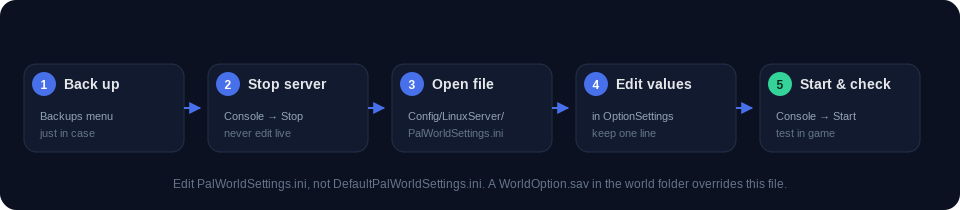
In short: back up the world → stop the server → open
Pal/Saved/Config/LinuxServer/PalWorldSettings.ini→ change values insideOptionSettings=(...)→ save → start the server → check in game.
Before you start
- Back up the world from the panel's Backups menu. A typo in the settings file does not damage the world, but a backup is still the quickest way out if something goes wrong.
- The server must have been started at least once. The server only creates the
Configfolder on its first run. - Plan for about 5 minutes of downtime. Online players will be disconnected.
Where the settings file lives
| File | Location | Purpose |
|---|---|---|
PalWorldSettings.ini | Pal/Saved/Config/LinuxServer/ | The file the server reads. Edit this one. |
DefaultPalWorldSettings.ini | Server root folder | A template with every setting at its default value. Editing it has no effect. |
If PalWorldSettings.ini is empty or missing, copy the whole content of DefaultPalWorldSettings.ini into it, then edit that copy.
Step 1 — Stop the server
Open Console, click Stop, and wait until the server has fully stopped. Do not edit while the server is running: on shutdown the server can write the settings file again, and your changes are lost.
Step 2 — Open PalWorldSettings.ini
- Open the Files menu.
- Go to
Pal→Saved→Config→LinuxServer. - Click
PalWorldSettings.inito open it in the panel editor.
It looks roughly like this, with every setting on one long line:
[/Script/Pal.PalGameWorldSettings]
OptionSettings=(Difficulty=None,DayTimeSpeedRate=1.000000,NightTimeSpeedRate=1.000000,ExpRate=1.000000,PalCaptureRate=1.000000, ... ,DeathPenalty=Item, ...)
Step 3 — Change the values you want
Find the setting name and change only its value. For example, for double EXP and a 1.5× capture rate:
ExpRate=1.000000   →   ExpRate=2.000000
PalCaptureRate=1.000000   →   PalCaptureRate=1.500000
Then click Save Content.
Syntax rules you must follow
The server shows no error when the syntax is wrong. If a single character is off, the whole OptionSettings block is ignored and the server silently falls back to default settings. So watch these:
- Keep it on one line. Do not press Enter inside
OptionSettings=(...). Text that only looks wrapped because of the screen width is fine. - Change values only. Do not delete, add, or reorder setting names.
- No spaces around
=or after commas. - Match the value type:
- Decimal numbers keep a dot and decimals, for example
2.000000or2.0, not2,0. - Whole numbers have no dot, for example
BaseCampWorkerMaxNum=20. - Yes/no values are
TrueorFalse, capitalized. - Fixed choices are written exactly, for example
DeathPenalty=Item(notitem). - Text goes in double quotes, for example
ServerName="Our Server".
- Decimal numbers keep a dot and decimals, for example
- Keep the brackets complete. The line ends with a single
)and no comma before it.
Step 4 — Start the server and check
- Go back to Console, click Start, and wait until the server finishes loading.
- Join the server and check an easy-to-see change, such as the EXP from defeating a Pal or how long daytime lasts.
- If everything still feels like the defaults, see If your changes do not apply.
Most commonly changed settings
The defaults below are for Palworld version 1.0. Later versions may change them, so the DefaultPalWorldSettings.ini on your server is always the most accurate reference. Some names really are spelled "Decreace" by the game developer; do not correct the spelling.
Progression and world
| Setting | Default | What it does |
|---|---|---|
Difficulty | None | Difficulty preset. Leave it at None so the values below are used. |
ExpRate | 1.000000 | EXP multiplier. 2.000000 = double. |
PalCaptureRate | 1.000000 | Pal capture chance multiplier. |
PalSpawnNumRate | 1.000000 | Wild Pal density. Higher values add server load. |
DayTimeSpeedRate | 1.000000 | How fast daytime passes. Higher = shorter days. |
NightTimeSpeedRate | 1.000000 | How fast nighttime passes. Higher = shorter nights. |
PalEggDefaultHatchingTime | 1.000000 | Huge Egg hatching time, in hours. Other eggs scale with it. |
CollectionDropRate | 1.000000 | Materials from trees, rocks, and other nodes. |
EnemyDropItemRate | 1.000000 | Items dropped by enemies and Pals. |
Combat and survival
| Setting | Default | What it does |
|---|---|---|
PlayerDamageRateAttack | 1.000000 | Damage dealt by players. |
PlayerDamageRateDefense | 1.000000 | Damage taken by players. Lower = tougher players. |
PalDamageRateAttack | 1.000000 | Damage dealt by Pals. |
PalDamageRateDefense | 1.000000 | Damage taken by Pals. |
PlayerStomachDecreaceRate | 1.000000 | How fast players get hungry. |
PlayerStaminaDecreaceRate | 1.000000 | How fast player stamina drains. |
DeathPenalty | Item | What drops when a player dies (see the table below). |
bEnableInvaderEnemy | True | Enemy raids on bases. False turns them off. |
DeathPenalty options:
| Value | What drops on death |
|---|---|
None | Nothing |
Item | All items except equipped gear |
ItemAndEquipment | All items including equipment |
All | All items and every Pal in the party |
Bases, guilds, and PvP
| Setting | Default | What it does |
|---|---|---|
BaseCampWorkerMaxNum | 15 | Working Pals per base (max 50). Higher values add server load. |
BaseCampMaxNumInGuild | 4 | Bases per guild (max 10). |
GuildPlayerMaxNum | 20 | Players per guild. |
bIsPvP | False | Turns on PvP. |
bEnableFastTravel | True | Turns on fast travel. |
Server settings: name, password, and slots
ServerName, ServerPassword, AdminPassword, ServerPlayerMaxNum, and the ports are also in this file. If the same setting is available on the panel's Startup tab, change it there instead of in the file. Startup values can be written back to the file every time the server starts, so a direct edit in the file would be reverted.
Do not change the ports in the file. The panel already sets the server port from the allocation in the Network menu; a different port stops players from joining.
If your changes do not apply
Check in this order:
- The file was edited while the server was running. Stop the server, edit again, save, then start.
- There is a syntax mistake. Compare your line with
DefaultPalWorldSettings.ini: look for a missing or extra quote, comma, or bracket, stray spaces,trueinstead ofTrue, or an Enter in the middle of the line. - There is a
WorldOption.savfile. OpenPal/Saved/SaveGames/0/<world-ID>/. IfWorldOption.savsits next toLevel.sav, the server uses the settings from that file and ignoresPalWorldSettings.ini. It usually comes along when you upload a world from single player or co-op. To fix it: stop the server, back up the whole<world-ID>folder, delete onlyWorldOption.sav, then start the server.
Troubleshooting
| Problem | Common cause | Fix |
|---|---|---|
| Every setting is back to default | A syntax mistake in OptionSettings, so the server uses defaults | Fix the syntax using the rules above, then restart |
| Changes disappear after a restart | The file was edited while the server was running | Stop the server first, then edit |
| Only one world ignores the changes | A WorldOption.sav in the world folder | Back up, then delete WorldOption.sav |
| Server name or password reverts | The value is managed from the panel's Startup tab | Change it on the Startup tab |
| Players cannot join after editing | The port was changed in the file | Restore the previous port; set ports only from the panel |
| The server feels heavy after changing settings | PalSpawnNumRate or BaseCampWorkerMaxNum is too high | Lower the values step by step |
The Config/LinuxServer folder is missing | The server has never been started | Start the server once, stop it, then try again |
Safe practices
- Back up the world before changing settings, especially
DeathPenalty,bIsPvP, andbHardcore. - Change a few settings at a time, then test. If something breaks, the cause is easier to find.
- Keep a copy of a working
OptionSettingsline on your computer. - Announce big changes (such as PvP or the death penalty) to players before applying them.
- Never share
AdminPassword.
Checklist
- The world has been backed up.
- The server was stopped before editing.
- You edited
Pal/Saved/Config/LinuxServer/PalWorldSettings.ini, notDefaultPalWorldSettings.ini. -
OptionSettings=(...)is still one line, with no extra spaces and complete brackets. -
True/Falseand choices such asDeathPenalty=Itemare written exactly. - Server name, passwords, and slots were changed on the Startup tab when available there.
- The server was started and the changes show up in game.
If the settings still do not apply, contact Skyes Hosting support and include your server name and the OptionSettings line you use.
Was this article helpful?